

Redeem via Giftcode
This order contains gift code, which must be redeemed through Roblox.
Select Package
Payment Method
Instant Delivery — Payment is verified automatically upon completion.

Pay with Visa/Mastercard/Amex

Supports over 100+ cryptocurrencies

Pay with your Kyubi.gg wallet balance
Promo Code
(Optional)Order Summary
100% Secure - Encrypted Checkout
How to Redeem Roblox Gift Code?
Go to the Official Roblox redemption page at www.roblox.com/redeem
Note: ensure that it is the official Roblox link.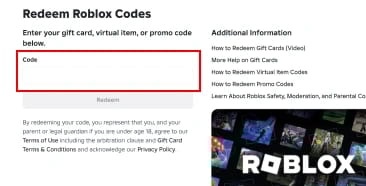
Login to your Roblox account that you want to recharge.
Paste your gift code into the code field and click "Redeem."
Please Note: Your gift code will be sent to the email address you entered at checkout. If you do not see it in your primary inbox, check your spam or junk folder.
About Roblox - Giftcode
What Is Roblox?
Roblox is a free-to-play online platform where millions of players create, share, and explore user-generated games and experiences. Known for its signature blocky art style, Roblox lets you connect with friends, join communities, and dive into a massive library of games spanning every genre — from adventure and role-playing to open-world exploration and interactive stories.
You do not need to be a game developer to enjoy Roblox. Thousands of experiences are built and published by independent creators and established studios alike, including Uplift Games, the team behind Adopt Me!, one of the most popular games on the platform. With tens of thousands of games available, there is something for every type of player, whether you are looking for a new favorite game or simply want to meet new people.
What Are Robux? — Roblox Virtual Currency Explained
Robux is the official virtual currency of Roblox, used across the entire platform to enhance your experience. You can spend Robux to purchase avatar items, game passes, in-experience upgrades, and premium content. Whether you are a player looking to customize your character or a developer monetizing your creations, Robux is central to everything on Roblox.
Why Do Players Buy Robux?
Robux unlocks the full Roblox experience and gives players access to content that free accounts cannot reach:
Avatar customization: Stand out with exclusive clothing, accessories, and gear that let you express your personal style.
Game passes and premium content: Unlock special abilities, skip progression, or access VIP areas in your favorite experiences.
Supporting creators: Your purchases directly fund the independent developers building the games you enjoy.
How to Get Robux
Purchase Robux
Official channels: Buy Robux directly through the Roblox mobile app (iOS and Android), the Roblox website, PlayStation, or Xbox.
Official gift cards at a discount: Buy Roblox gift cards from Kyubi.gg for lower prices (up to 35%) than standard retail.
Roblox Premium subscriptions: Subscribe to receive a monthly Robux stipend automatically.
Earn Robux
Sell avatar items: On the Roblox Marketplace and earn a percentage of each sale.
Build and publish experiences: Developers can monetize through game passes, subscriptions, and in-experience purchases.
Why Buy Robux Gift Cards from Kyubi.gg?
Official Roblox Gift Cards — 100% Safe for Your Account
Kyubi.gg sells genuine, officially licensed Roblox gift cards. There are no third-party Robux generators and no unauthorized top-up methods — which means zero risk of account bans, chargebacks, or fraud.
Cheaper Than Amazon and Retail
Get more Robux for your money. Kyubi.gg gift card prices are consistently lower than Amazon and standard retail rates, so you always get the best value.
Instant Delivery — Under 60 Seconds
Most orders are delivered in under 60 seconds. If any issue arises, the support team resolves problems within 1 hour during working hours and no later than 1 business day.
No Chargeback Risk
Unlike peer-to-peer Robux sellers or gray-market resellers, officially licensed gift cards carry no chargeback or fraud risk. Your account and your purchase are fully protected.
How to Check Your Robux Balance
On Mobile (iOS and Android)
Log in to your Roblox account.
Tap the Robux icon at the top of the app.
Your current balance is displayed immediately.
On Web Browser
Log in to your Roblox account.
Your Robux balance appears in the upper-right corner of the screen.
How Do I Gift Robux to a Friend?
Gifting Robux is simple with Kyubi.gg! Purchase a Roblox gift card for the amount you would like to give, then send the code to your friend or family member. They can redeem it directly to their account at www.roblox.com/redeem.
Frequently Asked Questions
316 reviews